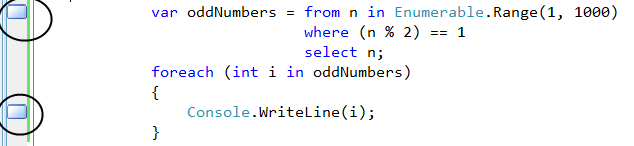
Here's a quick tip to boost your source code browsing speed:If you need to constantly go back and forth between a few spots in code, place (toggle) a bookmark by pressing CTRL+B+T , then you can always go to the next bookmark by pressing
CTRL+B+N or to the previous bookmark by pressing CTRL+B+P
UPDATE: As simontew points out in the comments, the exact key mapping depends on your mappings. See this article for more details.


6 comments:
In Vim, you can use ma to set a mark and 'a to jump to a mark, where a can be any letter. There's also a bunch of related commands that let you jump from one mark to another and whatnot.
Good point! I still use gVim for viewing text files and sometimes XML. I should probably invest more time and learn more ins and outs VIM so that I'm more productive when using it. Every time I want search for a regular expression in VI, I have to look up how to do it. Do you have any good references you use for VIM?
The sad part about this post is that I hadn't started using bookmarks in Visual Studio out of need until today.
There's always Vim's online help system. If you pick a command and ask for help on it, you can scroll around in the help window to see the entire article on that topic.
I've mainly been coasting on the same set of commands I've known for years now, which is probably less than 10% of what's available.
Inspired by this post and others, I finally figured out how to do a regex find and replace.
I concocted this one:
'<,'>s/\(\d\{3}\)\(\d\{3}\)\(\d\{4}\)/(\1) \2-\3
You can probably guess what my test case was :)
I feel like I'm missing something here. I've got copies of VS2003, VS2005 and VS2008 on my PC, and none of them use Ctrl+B... to access bookmarks.
For what it's worth, these are the shortcut keys I see:
Ctrl+K, Ctrl+K: Toggle bookmark.
Ctrl+K, Ctrl+N: Next bookmark.
Ctrl+K, Ctrl+P: Previous bookmark.
Ctrl+K, Ctrl+L: Clear all bookmarks.
Are there different key bindings for VB.NET than for C#?
simontew: You're absolutely right. They are layout specific. I'll update the post. Thanks for checking it out.
Post a Comment